20 Simple Steps to Set Up a Wonderful Home Office

Steps to set up a home office, Indeed, a well-set-up workspace is key to productivity and consistency.
Working from home is not that bad, but when you consider that you have to wake up to brush your teeth, make breakfast if you are alone, and do some things for your kids if you have kids before walking to your office to do your various tasks, it can be stressful and distracting.
For most people, working from home can be tempting and distracting. With little to no interaction with colleagues, this can lead to isolation and loneliness.
Fortunately, this home office setup is designed to help you optimize the gadgets and equipment you need.
We are going to cover everything from room temperature to ergonomic chairs to the kind of lighting you need for your home office
20 Simple Steps to Set Up a Wonderful Home Office
Knowing how to set up a home office for maximum productivity is essential. Here are 20 from-home office items you need to increase productivity while still maintaining your health.
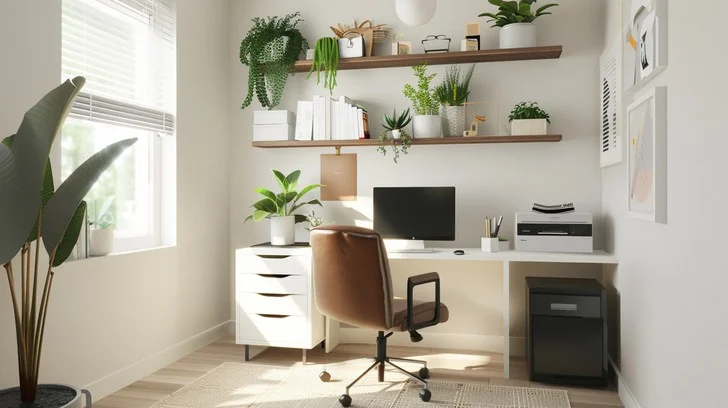
1. Assess Your Needs
Identifying what you need for your work is the first thing to consider before setting up your home office.
Consider the tools, technology, and space you need based on your job responsibilities.
2. Identify and create an ideal workstation
Pick a calm and quiet space free from any distractions like TV, family, and screen time (social media).
If you have space, a separate room with a door can clearly distinguish “work” time from “home” time.
However, if that’s not possible, even a corner of the living room can work.
3. Design an effective home office layout
Workflow must be prioritized, furniture must be arranged, designated areas must be created, ergonomic comfort must be ensured with adjustable furniture and storage options, the space must be personalized with motivating décor, and organization must be maintained to increase satisfaction and productivity.
4. Get the appropriate equipment for work from home.
The home office equipment you need for productivity and efficiency:
- Table or desk
- An ergonomic chair
- Stationary, including pens and notebooks
- Calendar
- Cabinet or filing place
- Favorite piece of art
Set up a workstation first, big enough for your laptop, water bottle, journal, or paper to jot down thoughts, decorative home office plants, etc.
If you work as a graphic designer or artist, you may require a larger workstation for your equipment.
However, a filing cabinet could be necessary for a consultant to keep client files.
Employers may need certain job requirements, such as industry-specific equipment.
5. Choose the right lighting
Having good and adequate lighting will boost productivity and enhance focus, colorful light exposure should be avoided as it can make you sleepy. For maximum efficiency throughout the day, natural illumination is ideal.
6. Temperature control
Temperature control in a home office is critical for preserving comfort and productivity, as high temperatures can cause distractions and discomfort.
It also promotes health, energy efficiency, and optimal equipment performance, improving work-life balance and general well-being.
According to research, an excessively cold room can be distracting and lead to more typing errors.
7. Incorporate Plants
Plants at the home office provide several advantages, including enhanced air quality by filtering pollutants and raising oxygen levels. Choose a plant that requires minimal care.
8. Take care of your health
Maintain excellent health in a home office by creating an ideal workspace, taking regular breaks, staying hydrated, snacking on nutritional foods, engaging in physical activity, and practicing mindfulness.
9. Establish a Routine
Clearly defining your workday’s beginning and ending times promotes organization and sustains productivity in a home office.
Establish boundaries and regular start and finish times for your job to reduce distractions and improve attention.
10. Do not underestimate your Artworks
Happy family memory pictures, motivational quotes, and wonderful paintings can massively improve your workflow in your day-to-day tasks and responsibilities in your home office.
11. Keep your business paperwork in a separate location.
Keeping professional documents in a designated space in your home office improves confidentiality, security, and organization while minimizing congestion.
Additionally, it aids in drawing a distinct line between work and personal life, which improves concentration and output.
12. Stay well-nourished
Keep easy-to-eat options like almonds, fruits, yogurt, or granola bars close at hand while preparing nutritious meals and snacks ahead of time to maintain a healthy home office.
Use a designated snack drawer or container to minimize distractions and make nutritious choices convenient. For optimal hydration and well-being during the day, have a water bottle at your desk.
13. Control the Environment
Controlling the environment in your home office is crucial for productivity and comfort. Focus on managing lighting, temperature, and air quality, while reducing noise and visual distractions.
14. Include Organizational Tools
Utilize resources such as project management software, digital calendars, planners, and an organized filing system to increase productivity and clarity in your home office.
Reduce congestion by using desk organizers, labeling systems, and storage options. Then, periodically review your arrangement to adjust to your changing needs.
15. Dress yourself
Getting ready for work in a home office is critical for mental adjustment, confidence, and productivity.
It promotes a regulated routine, prepares you for professional interactions in case you have any video calls, and establishes boundaries between work and personal life.
Overall, smart attire helps to create a more productive and focused work environment.
16. Choose a good painting color
For a home office, I propose blue or green. Soft blue encourages quiet and concentration, while subtle green promotes balance and tranquility.
Avoid bright colors such as red or orange since they might be overwhelming and distracting.
17. Breaks for relaxation
Taking brief and sweet breaks in a home office improves productivity and focus by recharging your mind and minimizing fatigue.
Set a timer for 5-10 minutes to return to work promptly and save any remaining tasks for later.
18. Keep track of time.
Never forget to keep track of your time. You never know how working from home can be time-consuming, so when you are working at home, always have a timer.
When you are working, never forget to keep track of your time.
You never know how working from home can be time-consuming, so when you are working at home, always have a timer like your smartphone’s alarm or a wall clock.
19. Evaluate Setup
Seasonal design changes, furniture rearrangements, and tech evaluations to improve efficiency are all part of regular home office improvements.
Regular decluttering allows you to refresh your inspiration board, change linens, and keep your space clean.
20. Cleaning Your Home Office
Cleaning, eliminating clutter, organizing digital files, making equipment checks, and keeping an ergonomic workstation are all part of running a home office.
Check air quality on a regular basis, clean tech, and reevaluate personal objects to maintain the environment inspiring and alter setups as needed.
Regular cleaning is one key practice you should implement in your home office to achieve your goals and maintain productivity.
Implementing these home office set up steps will not only give you a perfect work environment but also enhance your comfort and boost productivity, making you unstoppable in your various tasks and responsibilities in your home.
You can drop a comment for our team, letting us know how we have helped you with this article and what we miss and failed to mentioned.
Thank you very much for reading till the end.


Post Comment