Home Office Essentials: Your Guide to the Perfect Workspace

Working from home has become a reality for many of us, and it’s here to stay.
Whether you’re an entrepreneur, freelancer, or working remotely, having the right home office setup is key to your productivity.
Space, and I’ve learned firsthand how important it is to have the right equipment, space, and mindset.
Home office essentials play a crucial role in creating that ideal setup.
In this guide, I’ll walk you through everything you need to create a space that helps you work efficiently, stay focused, and make the most of your home office setup.
Trust me, it’s not just about buying a desk and a chair.
It’s about creating an environment that motivates you to get things done and helps you work at your best.
Home office essentials go beyond just the basics; they’re about creating an environment that motivates you to get things done and helps you work at your best.
1. Find Your Ideal Workstation: A Key Home Office Essential
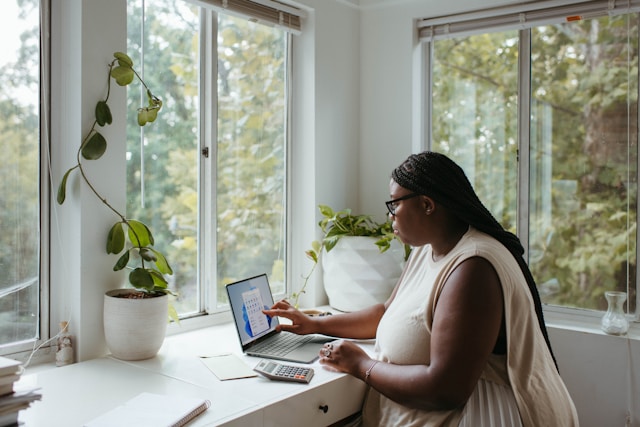
When I first started working from home, I figured I could just use any empty spot in the house.
I soon realized that was a mistake.
Between the TV running in the background and my dog’s constant attention-seeking, it was hard to focus.
So, after a little trial and error, I created a designated space where I could truly focus.
For me, that was a quiet corner away from all distractions.
It’s amazing how much of a difference that made in terms of focus and productivity.
Tip:
If possible, try to pick a room that has a door.
A door is not just a physical boundary—it creates a psychological one too, signaling that this is your dedicated workspace. Trust me, it’s worth it.
2. The Desk: One of the Most Important Home Office Essentials
The desk is where you’ll spend most of your time, so it needs to be both functional and comfortable.
At first, I went for a simple desk, thinking it was enough. But it wasn’t. The lack of space made it difficult to stay organized.
I ended up upgrading to a larger desk with ample storage space, and wow, what a difference that made.
Now, everything has its place, and I don’t feel cramped when I’m working.
Tip:
If you’re considering upgrading, an adjustable sit/stand desk like the IKEA Bekant has been a game-changer for me.
The ability to stand while working helps reduce back pain and boosts my energy.
3. A Solid Internet Connection: Don’t Settle for Less
When I first transitioned to remote work, I didn’t think much about my internet connection.
But I quickly learned that having a fast, reliable internet connection is absolutely crucial.
Video calls freezing, long download times, and dropped connections are productivity killers.
After some frustration, I upgraded to fiber optic broadband, and the improvement was night and day.
Fast internet is non-negotiable if you want to avoid those work-from-home headaches.
Tip:
If you’re dealing with multiple devices or people streaming in your home, consider investing in a mesh Wi-Fi system like Google Nest Wi-Fi to ensure that your connection stays strong in every corner of the house.
4. Add Some Life to Your Space with Plants: A Natural Home Office Essential
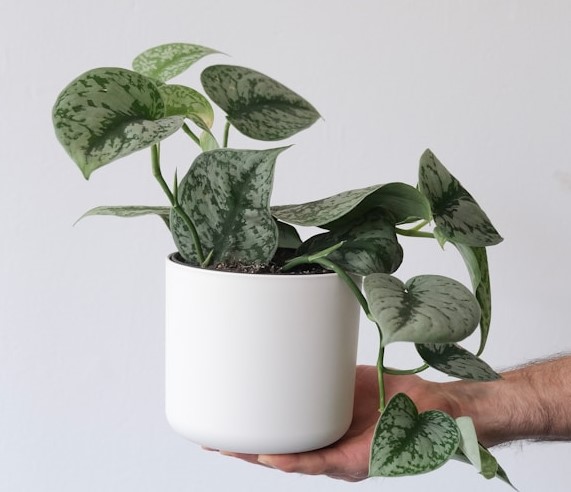
I used to think decor didn’t matter much when it came to a home office, but I was wrong.
Adding a few plants to my workspace made a huge difference.
Not only do they make the space feel more vibrant and welcoming, but plants are also proven to improve mood and productivity.
I’ve got a small succulent on my desk and a snake plant in the corner, and every time I glance at them, I feel more relaxed and focused.
Tip:
Don’t worry if you’re not a green thumb. Go for low-maintenance plants like succulents or snake plants.
They’re super easy to care for and still make a big impact.
5. Comfort is Key: Invest in the Right Chair as Part of Your Home Office Essentials
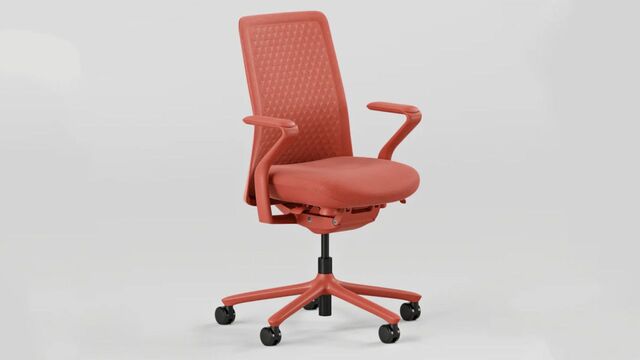
I learned this lesson the hard way: a cheap, uncomfortable chair will make you regret working from home.
I started with a basic dining chair, and after a few weeks of back pain, I realized I needed to invest in something better.
Having the right chair not only prevents discomfort but helps you stay focused longer.
I splurged on an ergonomic office chair, and let me tell you, it was worth every penny.
Tip:
If you want top-notch support, I recommend the Herman Miller Aeron chair.
It’s highly adjustable and provides excellent lumbar support. If you’re on a budget, look for chairs with adjustable features and good cushioning.
6. Printer: Because You’ll Need It
In the digital age, I didn’t think I’d need a printer at home.
But as soon as I started dealing with contracts, forms, and paperwork, I realized having a printer is a must.
I went with a compact, all-in-one model that also scans and copies. It’s saved me more times than I can count.
Tip:
Look for a wireless printer like the HP OfficeJet Pro. It’s compact, affordable, and doesn’t take up much space in your home office.
7. Backup Drives: Protect Your Work
At one point, I lost a few important files because I didn’t back up my work.
I’m not proud of it, but it was a valuable lesson.
Now, I back up all my files to both the cloud and an external hard drive. That way, I know I’m covered no matter what happens.
Tip:
I use the Seagate Backup Plus external drive. It’s reliable, offers plenty of storage, and keeps my files safe.
Trust me, you don’t want to find yourself in a position where you wish you’d backed up your data sooner.
8. Shredder: Keep Your Info Safe
Working from home means handling sensitive information.
Whether it’s financial documents, contracts, or business paperwork, privacy matters. A paper shredder is a must-have.
I keep mine nearby and make it a habit to shred anything with personal information on it.
Tip:
Invest in a solid paper shredder like the Fellowes Powershred. It’s compact, efficient, and handles a decent amount of paperwork at once.
Keeping your space secure is an essential part of working from home.
9. Stay Organized with Task Management Tools: Essential for Your Home Office Setup
One of the biggest challenges when working from home is staying on top of your tasks.
Without the structure of an office environment, it’s easy to get sidetracked. But with the right tools, you can stay organized and productive.
I use Trello to manage my tasks and deadlines. It’s simple to use and helps me track my projects.
I also block out time for each task to ensure I stay focused throughout the day.
Tip:
If you’re looking for something different, try Asana or Todoist. Find what works best for you, but the key is having a system that helps you stay on track.
10. Time Management: Use a Calendar and Timer as Key Home Office Essentials
Having a calendar to schedule your meetings and deadlines is non-negotiable when working from home.
I sync my phone’s calendar with my laptop to stay on top of everything.
I also use a timer to keep my work sessions focused—whether I’m working on a project or prepping for a meeting.
Tip:
Try the Pomodoro Technique—work in focused intervals of 25 minutes followed by a 5-minute break. It helps you maintain high levels of focus and energy throughout the day.
Conclusion: Make Your Home Office Work for You
Creating a productive home office isn’t about buying the latest gadgets or having the fanciest furniture.
It’s about setting up a space that helps you focus, stay organized, and feel comfortable.
Over time, I’ve learned that it’s the small details—like a good chair or an efficient printer—that make all the difference.
Home office essentials like these can help you create a space that maximizes your productivity.
Take your time to create a space that suits your needs.
Start with the basics, and as you settle in, make adjustments to fit your style and work habits.
With the right setup, you can turn your home office into a space where you feel motivated and inspired to get things done.
You can drop a comment for our team, letting us know how we have helped you with this article and what we miss and failed to mentioned.
Thank you very much for reading till the end.


Post Comment