Strategies for Managing Cables and Wires In Your Home Office

Cables and wires can be managed and properly organized in your home office if you follow these instructions.
When I work, I focus on my laptops, chairs, phones, and gadgets, but I often neglect the cables for those electronic devices.
Though often small and sometimes unnoticeable, cables and wires are crucial for maintaining a clean and organized home office for remote workers.
Improper cable management in a home office can increase the risk of accidents, such as trips, falls, or damage to equipment from tugging or pulling on cords.
When cables are disorganized, finding them quickly can be difficult, leading to time being wasted.
Mismanaged cables and wires can cause many problems, but these are just a few.
That’s why, in this article, we will explore effective ways to improve organization in our home offices.
7 Effective Strategies for Managing Cables and Wires in Your Home Office
1. Declutter and Organize for an organized cables and wires in the home office
The first and perhaps the most important step in organizing cables and wires is to declutter and categorize them.
To organize your cables, start by unplugging them all and gathering them in one place.
Then, sort the cables by type, such as power, USB, and audio/video.
Label each cable for easy identification, and prioritize the ones you use most often by keeping them easily accessible.
Store the less frequently used cables in a designated area out of the way.
This is the first step in creating a well-organized home office free of cluttered and tangled cables and wires.
2. Bring In Cable Sleeves for a Well organized cables and wires in the home office
Using cable sleeves in your home office is an effective way to manage and organize your wires and cables.
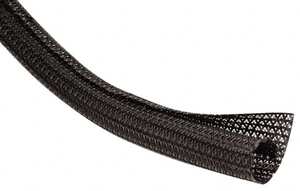
You can use cable sleeves as protective coverings designed to wrap around electrical cables, wires, or cords.
They help keep these items organized and shielded from external damage.
Many of us working from home often have gadgets and electronics with many wires and cables.
The cable sleeve bundles cables together, preventing tangles and helping to keep wires neatly organized.
Because they guard against damage and lower the chance of electrical failure, cable wraps help cables last longer.
They make areas more aesthetically pleasing by keeping cables neat and hidden.
You can also save money by preventing damage to wires and lowering the need for pricey replacements or repairs.
3. Consider Switching to Wireless Devices
Switching to wireless devices in your home office reduces cable clutter and provides greater flexibility and mobility, which can enhance your home office setup and improve ergonomics.

You can eliminate tangled cables and wires by introducing wireless electronics into your home office.
Devices like wireless keyboards, mice, headsets, earbuds, printers, and smart plugs are excellent tools for creating a clutter-free home office.
Fewer cables mean a more organized, cleaner workspace, which can improve productivity and reduce distractions.
With more wireless devices, your home office can become a more efficient, flexible, and visually appealing space that enhances workflow.
4. Make Sure You Get Cable Trays or Boxes
If you cannot afford wireless electronics, consider using cable trays and boxes in your home office.
You can manage and arrange cables in your home office with the help of a long, frequently shallow container or channel that you install beneath your desk or along the wall’s edge.
Cable boxes are meant to hide power strips and extra cables.
Usually covered, they might feature ventilation openings to allow air to circulate.
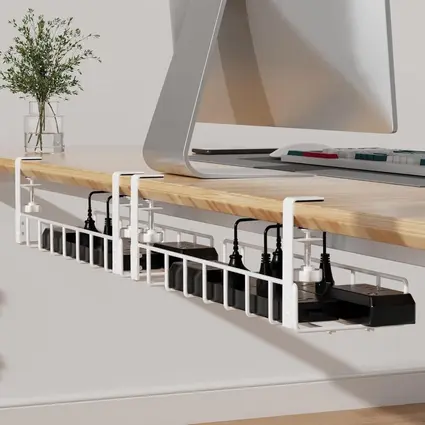
To keep long cables, power strips, and adapters organized, people frequently position cable trays along walls, beneath desks, or next to power outlets.
Cables are kept neat and hidden with the use of a mounted tray.
Phone and laptop chargers and other short cords can be neatly stored on desks with small cable boxes.
5. Use Cable Clips or Holders
Cable clips or holders are another essential tool for organizing cables in a home office.
Cable clips are compact devices, often featuring adhesive backing, intended to secure one or multiple cables.
You can affix them to different surfaces, including desks, walls, or underneath furniture, to direct cables along a preferred route.
Cable holders resemble clips but are designed to secure cables in specific locations, such as on your desk or next to your monitor.
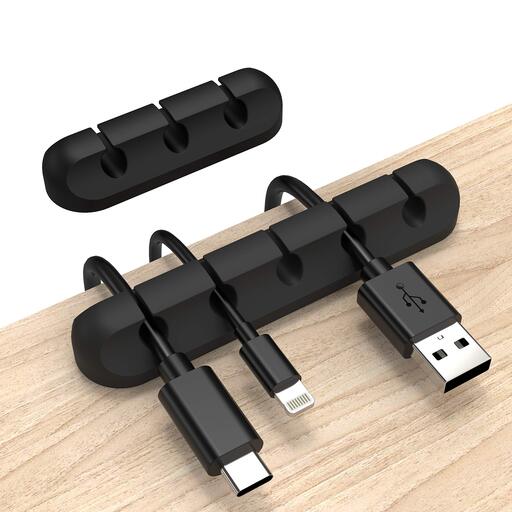
They could appear as a little tray, a hook, or a cord organizer.
Organize cables under your desk to hide them, and along the back for connections to your computer and printer.
Then, place small clips on the edge to access charging cables easily, and attach holders to the walls or near power outlets to keep cords tidy and accessible.
Organizing cables prevents desk clutter, makes them easily accessible, and creates a cleaner, more aesthetically pleasing workspace.
It also provides neat storage for unused cables and prevents tangling.
6. Labeling Your Cables
Labeling your cables is an essential aspect of organizing wires and cables in a home workspace.
It aids in maintaining organization while also simplifying the process of troubleshooting, replacing, or disconnecting particular cables when required.
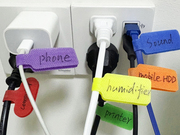
Utilize a label maker or ready-made labels to create descriptions for each cable, like Printer, Charging Cable, or Router.
Although labeling cables is essential, steer clear of lengthy descriptions that may clutter the label.
Use straightforward, brief language to ensure the labels are simple to read and comprehend.
Tagging cables helps you swiftly recognize which cable is connected to which device, saving time when plugging in or disconnecting equipment.
This is particularly beneficial in a home office with various devices and cords.
When a device fails to work, identifying the right cable is much simpler if it has a label.
If you’re aware of which cable corresponds to each device, you can swiftly identify if the cable is the problem.
Tagging your cables in your home office improves organization and efficiency, avoids harm, guarantees safety, and eases upkeep.
7. Keep Unused Cables In the Proper Place
You can manage unused cables in your home office by winding them up and placing them in labeled bins or drawers to avoid mess.

You can utilize them for new gadgets, crafting projects, or retain them as backups for journeys.
If you don’t require them anymore, think about donating, selling, or passing them on to friends, family, or nearby charities.
Cables can additionally be recycled at electronic recycling facilities or via manufacturer take-back initiatives to guarantee their responsible disposal.
Do not dispose of them in the garbage, since correct recycling aids in minimizing e-waste and promotes sustainability.
In Conclusion
In conclusion, managing cables in your home office is key to creating an organized, efficient, and safe workspace.
Using strategies like decluttering, labeling, and going wireless can improve productivity and reduce stress.
I remember a time, not too long ago, when I had no concept of cable management.
My home office was a chaotic tangle of wires, and I’d always trip over them while working late into the night.
One evening, I had an important video conference, and in my rush to unplug my laptop charger, I yanked the wrong cord.
It caused my monitor to crash—mid-presentation. My face went red, but the real lesson was the frustration of not having a clean, organized space.
That night, I took an hour to declutter my desk, label my cables, and use cable sleeves.
The difference was night and day. Since then, my workspace has been transformed into a sanctuary of productivity, where I can focus without worrying about a mess of wires.
That seemingly small step saved me time, stress, and a lot of future mishaps.
It’s funny how the simplest of changes, like managing cables, can bring so much clarity to your work life.
You can drop a comment for our team, letting us know how we have helped you with this article and what we miss and failed to mentioned.
Thank you very much for reading till the end.


Post Comment